
Testing the APIs you can't put on the internet
Most API testing tools can only reach public endpoints. Echopoint's self-hosted runner tests APIs behind a VPN or firewall — no inbound port required.
The hardest API to test is the one you can’t reach.
Your smoke tests are green against production, but the API that actually needs testing is staging — and staging lives behind a VPN. Or it’s an internal service in a private VPC with no public ingress. Or it’s an on-prem box that will never have a public hostname. A hosted test runner sitting on the public internet cannot open a connection to any of these. It doesn’t matter how good your assertions are if the request can’t leave the building.
Echopoint handles this with a self-hosted runner: it runs inside your network, reaches out to the control plane, and tests private APIs without exposing them. The cloud runner stays the default for everything that’s already public — you only reach for self-hosted when you actually need to.
Not every API is on the internet
The pattern shows up everywhere once you look:
- Staging behind a VPN. The environment you most want to test before a release is the one locked down the tightest.
- Private VPC services. Internal APIs that talk to each other on a private network and have no public DNS.
- On-prem and air-gapped systems. Common in fintech, healthcare, and anything with a compliance boundary.
- mTLS or IP-allowlisted endpoints. Technically reachable, but not from a shared cloud IP you don’t control.
The usual workarounds are all bad: open a hole in the firewall, expose staging to the internet “just for tests,” or give up and copy your test logic into a one-off script that happens to run inside the network. Now your tests live in two places and drift apart.
Two runners, one flow
Echopoint runs the same flow, unchanged, on any runner. You build a flow once — request nodes, extractors, 14 assertion operators — and decide where it executes when you launch it:
- Cloud runner — the default. Managed, zero setup. Launch from the UI, CLI, or API and Echopoint’s runner executes it. Use this whenever the API under test is reachable from the public internet.
- Self-hosted runner. A runner you operate on your own infrastructure, for flows that need to reach services the cloud can’t.
(There’s a third — an ephemeral runner that spins up inside a CI job and exits. More on that below.)
The honest guidance: don’t self-host if you don’t have to. If your API is public, the cloud runner is less to operate and less to think about. Self-hosting earns its keep the moment “the cloud can’t reach this” becomes true.
How the self-hosted runner reaches a private API
The whole design rests on one decision: which side opens the connection.
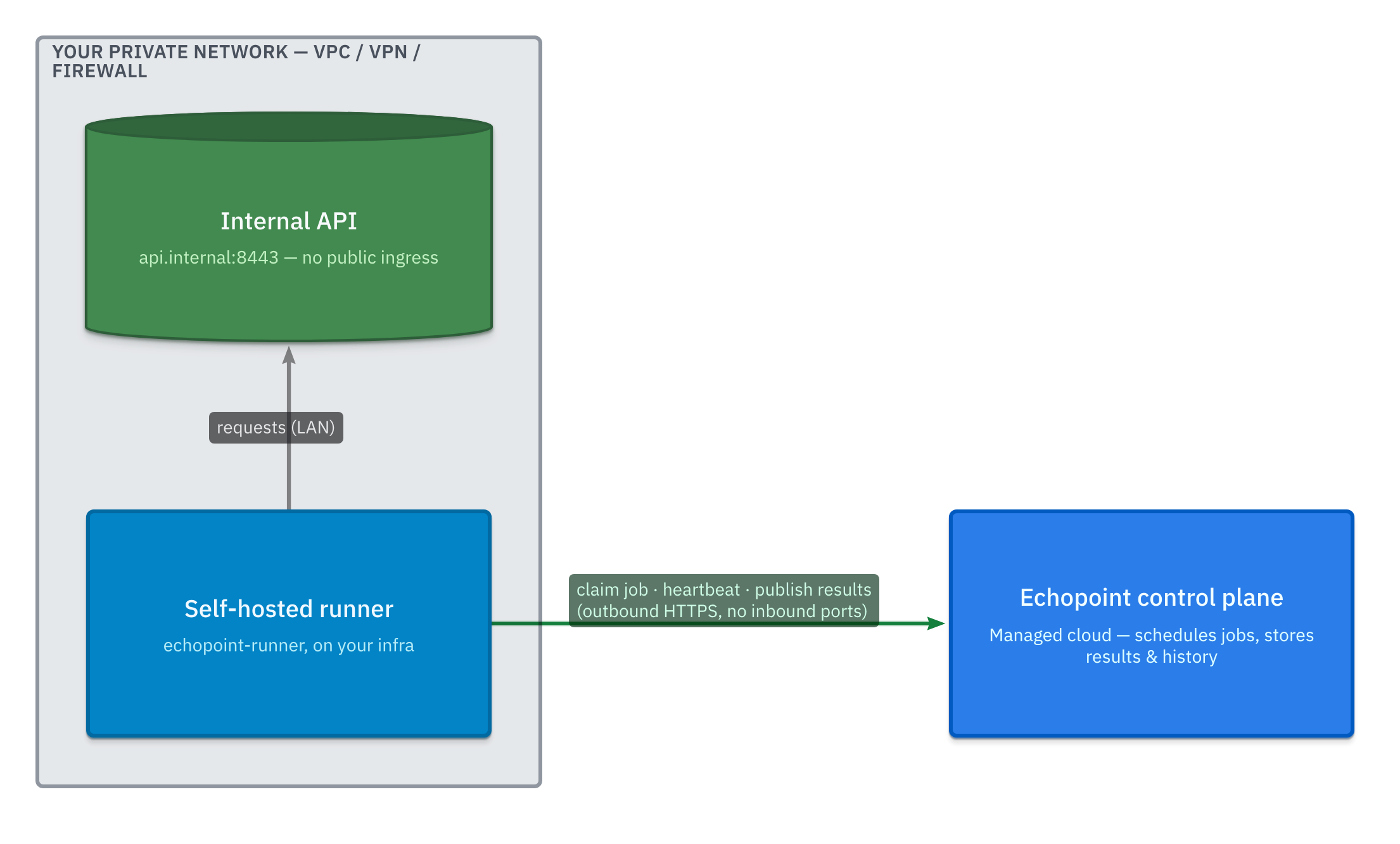
The runner lives inside your network, next to the API it tests. It never accepts inbound connections. Instead it dials out to the control plane over HTTPS and pulls work:
- Claim a job — the runner asks the control plane for the next job (
GET /runner/jobs/next) and takes a lease on it. - Receive the flow snapshot + resolved inputs — everything it needs to run, delivered down the connection it opened.
- Execute against the internal API — because the runner is on your network, it hits
api.internal:8443directly over the LAN. No tunnel, no exposed port. - Heartbeat — the runner reports that it’s alive and how loaded it is; the UI shows your live runners with their current load and heartbeat freshness.
- Publish results — node results, recorded assertions (expected vs actual), and status flow back, so run history looks identical to any other execution.
Because every connection is outbound, your firewall keeps doing its job. There’s no inbound port to open, no DMZ to stand up, and the control plane never needs a route into your network. The thing that makes private APIs hard to test — they’re unreachable from outside — is exactly the thing the runner sidesteps by being inside.
One more boundary worth calling out: resolved environment values are delivered only to the execution and are never logged. That holds across all three runner types.
Setting it up
The runner is public on GitHub — you run it on your infrastructure from github.com/nanostack-dev/echopoint-runner. Once it’s up and sending heartbeats, point a flow at it:
echopoint flows launch <flow-id> --runner self_hostedThat’s the same flow you built and ran against the cloud — it just executes inside your network now. The CLI (echopoint-cli) drives launches, tag-based suites, and CI runs; both the CLI and the runner are public on GitHub today, even though the hosted app is still in beta.
Ephemeral runners: the same flow, inside your CI job
For continuous integration there’s a third option that needs no standing infrastructure at all. An ephemeral runner spins up inside your CI job, runs the flow, and exits. The flow snapshot and resolved inputs are delivered to the process, it executes from within the job, and results are published back — so run history and node results look identical to a cloud or self-hosted run.
The payoff: it reaches whatever the job reaches. A service you started earlier in the pipeline, a preview deployment spun up for the pull request, a database seeded in a previous step — all fair game, with nothing to host between runs.
GitHub Action
The Action is nanostack-dev/echopoint-cli@v1. Point it at a tag (or specific flow IDs) and it runs the suite on every pull request:
name: API testson: pull_request
jobs:  smoke:    runs-on: ubuntu-latest    steps:      - uses: nanostack-dev/echopoint-cli@v1        with:          api-key: ${{ secrets.ECHOPOINT_API_KEY }}          organization-id: ${{ secrets.ECHOPOINT_ORG_ID }}          tags: smoke          environment: staging          parallel: 3
It takes api-key and organization-id (required), one of flow-id / flow-ids / tags, plus match-mode (any | all), environment, version-id, poll-timeout, and parallel. It exposes outputs you can branch on in later steps — execution-id, status (completed | failed | error), success (boolean), and results-json. The API key is auto-masked in logs, and resolved secrets are never printed.
The key scopes it needs: flows:execute and runner:complete (add flows:read if you select flows by tag).
Any other CI, or your terminal
Not on GitHub? The CLI does the same thing anywhere:
echopoint flows run --tag smoke --environment staging --parallel 3flows run takes positional flow IDs or --tag (repeatable, with --match-mode any|all, up to 50 flows), plus --environment, --version-id, --parallel, --idempotency-key, and -o json. It returns strict exit codes, so the build fails when a flow does:
0— all flows passed1— a flow failed an assertion2— the run was cancelled3— a contract or API error4— a poll timeout
Pin an exact flow with --version-id so CI always runs precisely what you reviewed.
Which runner, when
- Public API, on-demand runs → cloud runner. Nothing to operate.
- Private API — VPN, VPC, on-prem → self-hosted runner. Outbound-only, no exposed ports.
- Smoke suite on every push → ephemeral runner in CI, which reaches whatever the job reaches.
Same flow, same assertions, same run history. The only thing that changes is where the request originates from.
Echopoint is in beta and free while we build. If testing APIs behind a VPN is a problem you have, join the waitlist — and in the meantime, the runner and CLI are public on GitHub and yours to read.
FAQ
Do I have to open a firewall port for the self-hosted runner?
No. The self-hosted runner makes outbound HTTPS calls to the Echopoint control plane and claims work from it. Nothing connects in to the runner, so you don't expose an inbound port or poke a hole in your firewall.
Can the same flow run on both the cloud and a self-hosted runner?
Yes. Every Echopoint flow runs unchanged on any runner — cloud, self-hosted, or ephemeral in CI. You choose where it executes at launch time; the flow definition doesn't change.
Is the Echopoint runner code public?
Yes. The runner that executes flows is public on GitHub at github.com/nanostack-dev/echopoint-runner, alongside the CLI at github.com/nanostack-dev/echopoint-cli.
How do I run Echopoint flows in GitHub Actions?
Use the nanostack-dev/echopoint-cli@v1 Action. Give it api-key and organization-id plus a tag or flow IDs, and an ephemeral runner executes the suite inside your CI job. It returns status, success, and results-json outputs and strict exit codes (0 pass, 1 flow failed, 2 cancelled, 3 contract/API error, 4 poll timeout) so the build fails when a flow does. On any other CI, run `echopoint flows run --tag smoke` from the CLI.
Echopoint is free while in beta.
Join the waitlist and we'll let you in as your spot opens.