
API tests on every pull request, with one GitHub Action
One GitHub Action runs your Echopoint flows inside the CI job — reaching preview deploys and gating the PR with strict exit codes.
You want the API tests that gate a release to run against this pull request — the preview deploy, the service you just spun up in the pipeline, the migration that only exists on this branch. A test runner sitting in someone else’s cloud can’t see any of that.
Echopoint’s answer for CI is the ephemeral runner: add one GitHub Action, and your flows execute inside the CI job itself, reaching exactly what the job can reach. Each run publishes back to Echopoint so the history looks like any other execution, and the job’s exit code gates the PR.
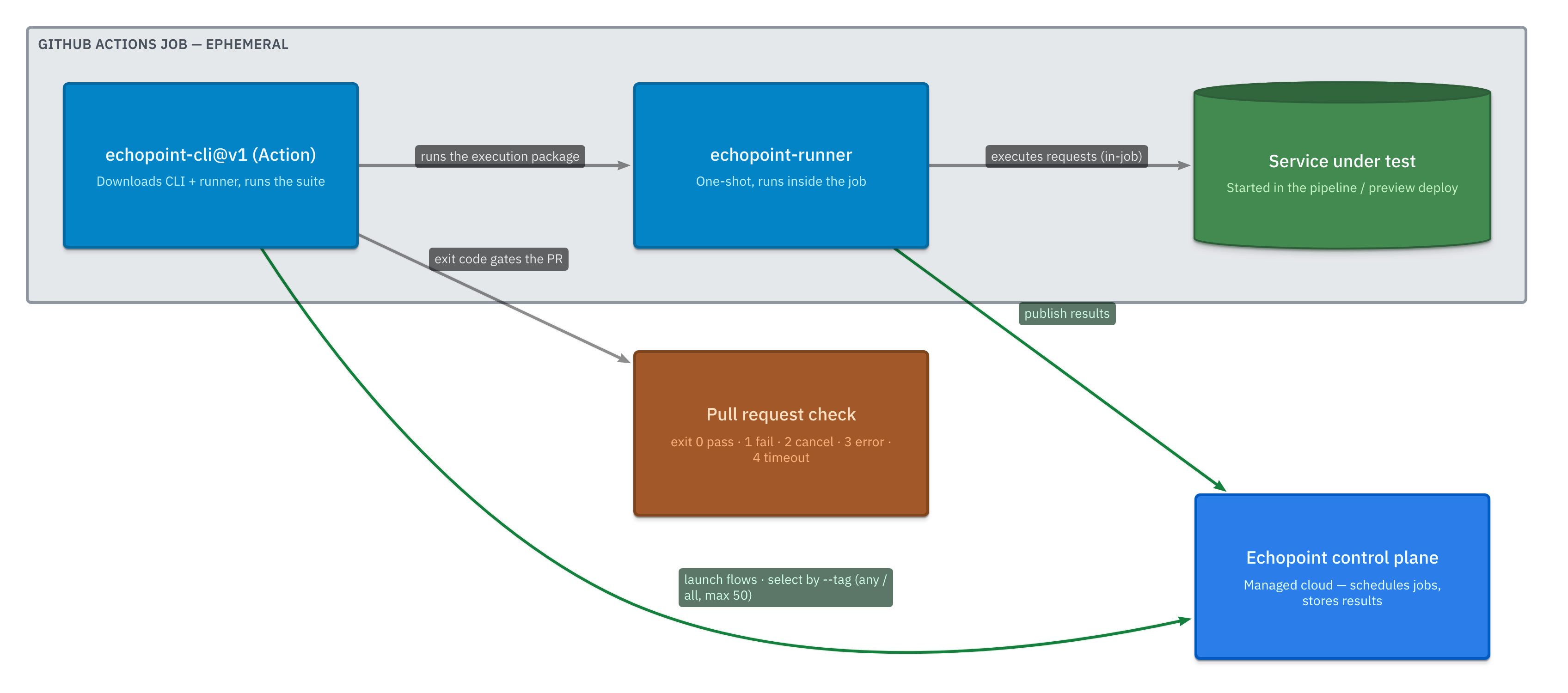
The ephemeral runner: tests that run inside your job
Echopoint has three runners — cloud (managed default), self-hosted (your infra), and ephemeral (one-shot, for CI). The ephemeral runner spins up inside the job, executes, and exits. There’s nothing long-lived to operate, and because it runs in the job, it reaches a preview deployment or a service started in an earlier step without any tunnel or exposed port.
The same flow you built and ran from the app runs unchanged here — same nodes, same 14 assertion operators, same recorded expected-vs-actual.
One Action, wired into your PR
name: API testson: pull_request
jobs:  smoke:    runs-on: ubuntu-latest    steps:      - uses: nanostack-dev/echopoint-cli@v1        with:          api-key: ${{ secrets.ECHOPOINT_API_KEY }}          organization-id: ${{ secrets.ECHOPOINT_ORG_ID }}          tags: smoke          environment: staging          parallel: 3
The Action is a composite that does the unglamorous parts for you:
- Masks the API key as its first step, so it never appears in logs.
- Validates that you gave it exactly one selector —
flow-id,flow-ids, ortags— and a saneparallel/match-mode. - Downloads the right
echopointCLI andechopoint-runnerbinaries for the job’s OS/arch (pin them withcli-version/runner-version, or bring your own withrunner-binary). - Runs
echopoint flows runand exits with its exit code — so a failing flow fails the check.
It surfaces results two ways. As step outputs you can branch on:
| Output | Meaning |
|---|---|
status | completed, failed, or error |
success | true only if every flow passed |
execution-id / execution-ids | the execution(s), for linking or follow-up |
results-json | the full machine-readable result |
…and as a rich job summary — a pass/fail table per flow, and for failures, the exact failed nodes and each failed assertion (extractor, operator, expected vs actual). You see why a run went red without leaving the PR.
Under the hood: launch → package → run → publish
The CLI doesn’t ship your flow logic in the binary. For each flow it:
- Launches the flow on the control plane with
runner_type=ephemeral. - Receives an execution package — the resolved flow definition, the inputs for your chosen
environment, and any referenced child flows (Module nodes). - Runs that package through
echopoint-runnerlocally (the runner reads it on stdin, executes against whatever the job can reach, writes the result to stdout). - Publishes the result back, so node results and history match every other run.
--parallel N runs several flows concurrently. --poll-timeout bounds each execution (the Action defaults to 300s). And in CI the CLI auto-derives an idempotency key from the GitHub environment when GITHUB_ACTIONS=true, so a re-run of the same job reuses the execution instead of double-launching.
One boundary worth stating plainly: resolved environment values are delivered only to the execution and are never logged, and the Action masks the API key on top of that.
Organizing suites with tags
Tags are how you turn “all my flows” into “the smoke suite”. It’s a two-step process.
Tag the flows — add or remove tags by ID or by a search filter:
# tag specific flowsechopoint flows tag <flow-id> <flow-id> --add smoke
# tag everything matching a searchechopoint flows tag --query checkout --add smokeechopoint flows tag --match-tag staging --match-mode all --add smoke
Tags are lowercased, de-duplicated, and merged with each flow’s existing tags server-side — tagging is additive and only touches the tag field. (Tagging every flow in the org is intentionally not allowed; you must pass IDs or a filter.)
Select the suite at run time with --tag (repeatable):
echopoint flows run --tag smoke --environment staging --parallel 3--match-mode any (the default) runs flows carrying any of the tags; --match-mode all requires every tag. Tag selection resolves through flow search and is capped at 50 flows — if a tag matches more than that, the run stops and asks you to narrow it, rather than quietly launching a huge batch from CI.
Any other CI, or your terminal
The Action is a thin wrapper around the CLI, so anything that isn’t GitHub works the same way — install the CLI + runner, then:
echopoint flows run --tag smoke --environment staging -o json-o json emits one machine-readable object (single-flow, or a results array for multi-flow); drop it for human-readable output, or add --verbose to stream each node’s status as it runs.
Exit codes
The CLI — and therefore the Action — returns a precise exit code so your pipeline reacts correctly:
| Code | Meaning |
|---|---|
0 | all flows passed |
1 | a flow failed (assertion or runner failure) |
2 | cancelled |
3 | API / runner / contract error |
4 | poll timeout |
Code 1 means your API is wrong; 3 and 4 mean the run couldn’t complete. Keeping them separate means a flaky network doesn’t look like a failing test.
Echopoint is in beta and free while we build. If “API tests on every PR” is on your list, join the waitlist — the CLI (which is also the Action) and the runner are public on GitHub and yours to read today.
FAQ
How do I run Echopoint flows in GitHub Actions?
Add the nanostack-dev/echopoint-cli@v1 Action to a job, pass api-key and organization-id plus a tag or flow IDs. It downloads the CLI and runner, runs the suite as an ephemeral execution inside the job, writes a results summary, and exits non-zero if any flow fails — which fails the PR check.
How does Echopoint select which flows to run by tag?
Tag flows with `echopoint flows tag --add smoke …`, then select them with `--tag smoke` (repeatable). `--match-mode any` (default) runs flows with any of the tags; `--match-mode all` requires every tag. Tag selection resolves through flow search and is capped at 50 flows so an over-broad tag can't launch a huge batch.
What do the CLI exit codes mean in CI?
0 = all flows passed, 1 = a flow failed (assertion or runner failure), 2 = cancelled, 3 = API/runner/contract error, 4 = poll timeout. The Action exits with the same code, so a failing flow fails the build while infrastructure errors stay distinguishable.
Echopoint is free while in beta.
Join the waitlist and we'll let you in as your spot opens.